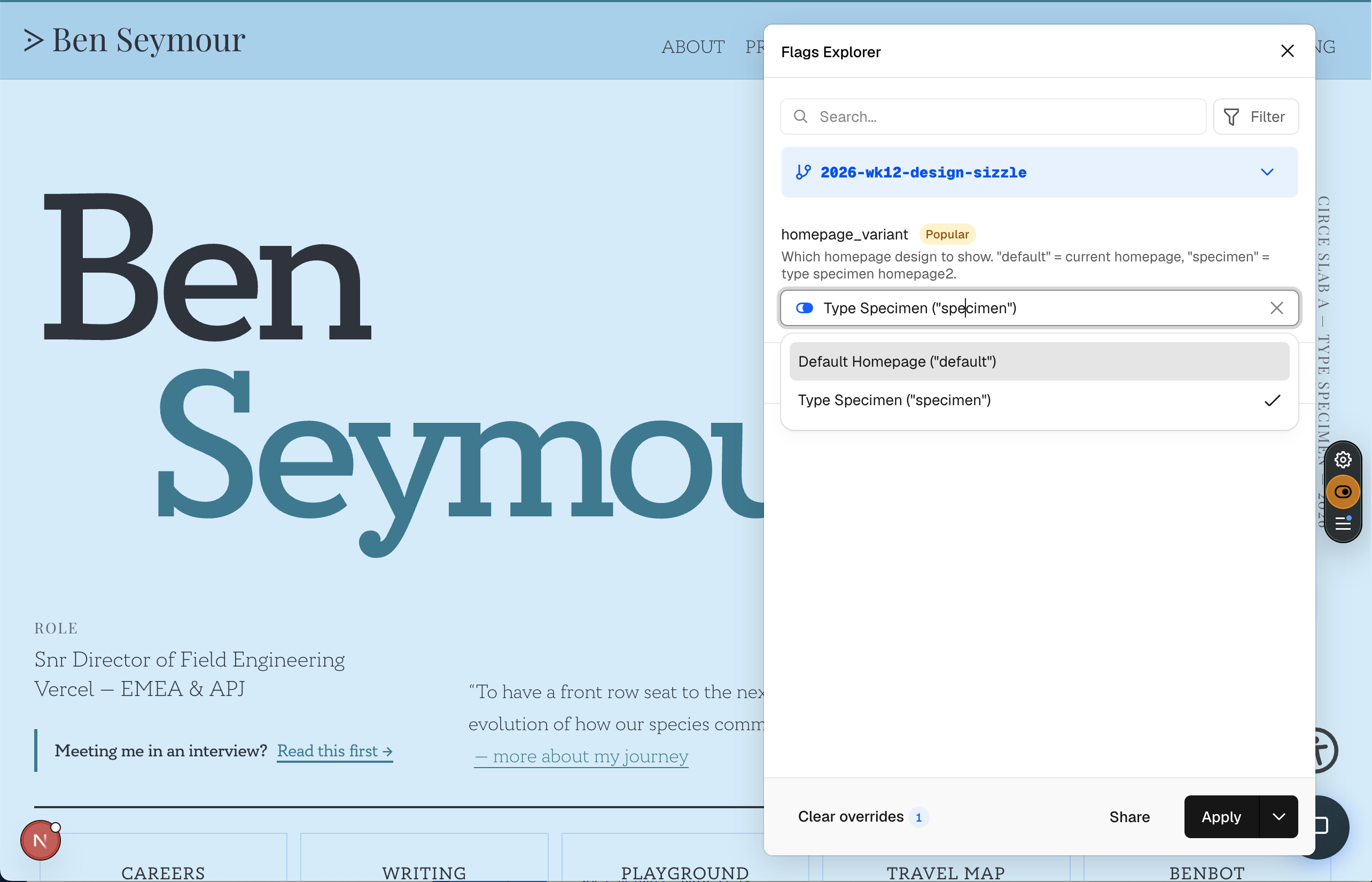
I've been experimenting with a new homepage design for this site - a type specimen layout that's a significant departure from the current one. Rather than shipping it and hoping for the best, I wanted a way to toggle between the two versions without redeploying. Feature flags seemed like the right tool. Here's how I set it up using Vercel Edge Config, the flags SDK, and the Vercel Toolbar.
The setup
The architecture is straightforward:
- Vercel Edge Config stores the flag value (
homepage_variant:"default"or"specimen"). - A proxy (Next.js middleware-style) reads the flag on every request to
/and rewrites to/homepage2when the variant is"specimen". - The Vercel Toolbar lets me override the flag locally without touching the Edge Config dashboard - toggle, refresh, done.
- The
flagsSDK (v4) handles flag definitions, the discovery endpoint, and encrypted cookie overrides.
The Edge Config part was quick. Create a store, add a homepage_variant key, connect it to the project, and read it in the proxy:
const flagsConfig = createClient(process.env.EDGE_CONFIG_FLAGS);
const edgeValue = await flagsConfig.get('homepage_variant');
if (edgeValue === 'specimen') {
  return NextResponse.rewrite(new URL('/homepage2', request.url));
}
That worked immediately. The interesting part was getting the Toolbar integration right.
The Toolbar: three bugs in one evening
The Vercel Toolbar has a Flags Explorer that discovers your flags via a .well-known/vercel/flags endpoint and lets you override them locally. The overrides are stored in an encrypted cookie, so they travel with your browser session without touching production config.
Getting it working required solving three problems.
1. The local file that shadowed the npm package
I'd created a flags.ts file at the project root to define my flag. Reasonable name. Except that when you import from 'flags', Turbopack resolves that to your local file, not the npm flags package. Every import of verifyAccess, version, decryptOverrides - all the SDK utilities - was silently importing from my flag definitions file, which obviously doesn't export any of those things.
The fix was renaming flags.ts to lib/feature-flags.ts. Obvious in hindsight. The error message - "Export version doesn't exist in target module" - was clear enough, but it took a while to realise the resolution was wrong rather than the export being missing.
2. The encrypted cookie
The Toolbar doesn't store flag overrides as plain JSON. It encrypts them using JWE with your FLAGS_SECRET. My first pass at reading the override cookie was:
const overrides = JSON.parse(overrideCookie); // Wrong
This silently failed (the encrypted string isn't valid JSON), fell through to the catch block, and the proxy happily ignored the toolbar override and used the Edge Config value instead. No error, no warning - just a feature that appeared to do nothing.
The fix:
const flagsModule = await import('flags');
const overrides = await flagsModule.decryptOverrides(overrideCookie);
3. The override that got overridden
This was the subtlest one. Even after fixing the decryption, toggling the flag to "Default Homepage" in the toolbar still showed the specimen page. The logic was:
let variant = 'default';

// Read toolbar override → variant = 'default' ✓
// ...

// If no override, check Edge Config
if (variant === 'default') {
  variant = await edgeConfig.get('homepage_variant'); // → 'specimen' ✗
}
When the toolbar explicitly set the variant to "default", the Edge Config check still ran - because variant === 'default' was true - and overwrote it back to "specimen". The toolbar's choice was being discarded every time.
The fix was a boolean to track whether the toolbar had spoken:
let hasToolbarOverride = false;

if (overrideCookie) {
  const overrides = await decryptOverrides(overrideCookie);
  if (overrides?.homepage_variant !== undefined) {
    variant = overrides.homepage_variant;
    hasToolbarOverride = true;
  }
}

if (!hasToolbarOverride) {
  variant = await edgeConfig.get('homepage_variant');
}
Simple. But it took tracing through the full request lifecycle to spot it.
The cache gotcha
One more thing worth mentioning, because it cost time to diagnose. If you're using an AI coding assistant that controls a browser (in my case, Google's Antigravity), be aware that the browser profile it uses may have its own cache behaviour. I was seeing "Missing version information" errors in the Flags Explorer that didn't appear in my regular Chrome profile.
The fix: open DevTools in the profile the assistant is using and tick "Disable cache" in the Network tab. The toolbar's discovery request was being served from a stale cached response that didn't include the x-flags-sdk-version header. With the cache disabled, the fresh response came through and the Flags Explorer worked immediately.
It's one of those issues that's invisible until you know to look for it - and then completely obvious.
The discovery endpoint
For the Toolbar to find your flags, you need a route at app/.well-known/vercel/flags/route.ts. The flags SDK provides createFlagsDiscoveryEndpoint, but I ended up writing it manually using NextResponse to ensure the x-flags-sdk-version header was preserved:
import { NextResponse } from 'next/server'
import { verifyAccess, version } from 'flags'
import { getProviderData } from 'flags/next'
import * as flags from '@/lib/feature-flags'

export async function GET(request) {
  const access = await verifyAccess(request.headers.get('Authorization'))
  if (!access) return NextResponse.json(null, { status: 401 })

  return NextResponse.json(getProviderData(flags), {
    headers: { 'x-flags-sdk-version': version },
  })
}
What I'd do differently
If I were setting this up again, I'd start by naming my flag definitions file something that can't collide with an npm package - lib/feature-flags.ts from the beginning. And I'd add a quick console.log in the proxy to confirm the override cookie is being read correctly before assuming the wiring is complete. Most of the debugging time was spent on silent failures - things that looked like they should work but quietly did nothing.
Feature flags with Edge Config and the Toolbar are genuinely useful once they're wired up. The ability to toggle between homepage designs without redeploying - and without committing to one - makes experimentation low-risk. The setup just has a few sharp edges that are worth knowing about upfront.
What's next: split testing
What I've built so far is a manual toggle - I choose which variant to show. But the flags SDK also supports percentage-based rollouts and A/B testing. You can configure a flag to show variant A to 50% of visitors and variant B to the other 50%, with consistent assignment per user (so the same visitor always sees the same variant across sessions).
Combined with Vercel Analytics or a third-party provider, you could measure which homepage variant leads to better engagement - time on page, scroll depth, click-through to projects - and let the data decide rather than guesswork. The flag definitions already support an options array with labels and values, and the decide function can incorporate user-specific context for consistent assignment.
That's where this is heading next. The manual toggle was the foundation. Split testing is the payoff.