A long time ago I had an evening to myself and decided to see how much fun I could have with Node.js in just an hour. The modern hello world back then wasn't "Hello World" in the terminal-it was posting a status to Twitter. I installed node-twitter-api, got my consumer key and secret from dev.twitter.com, fixed the "read-only application cannot POST" hiccup, and hey presto: my first tweet from code. That was 2013.
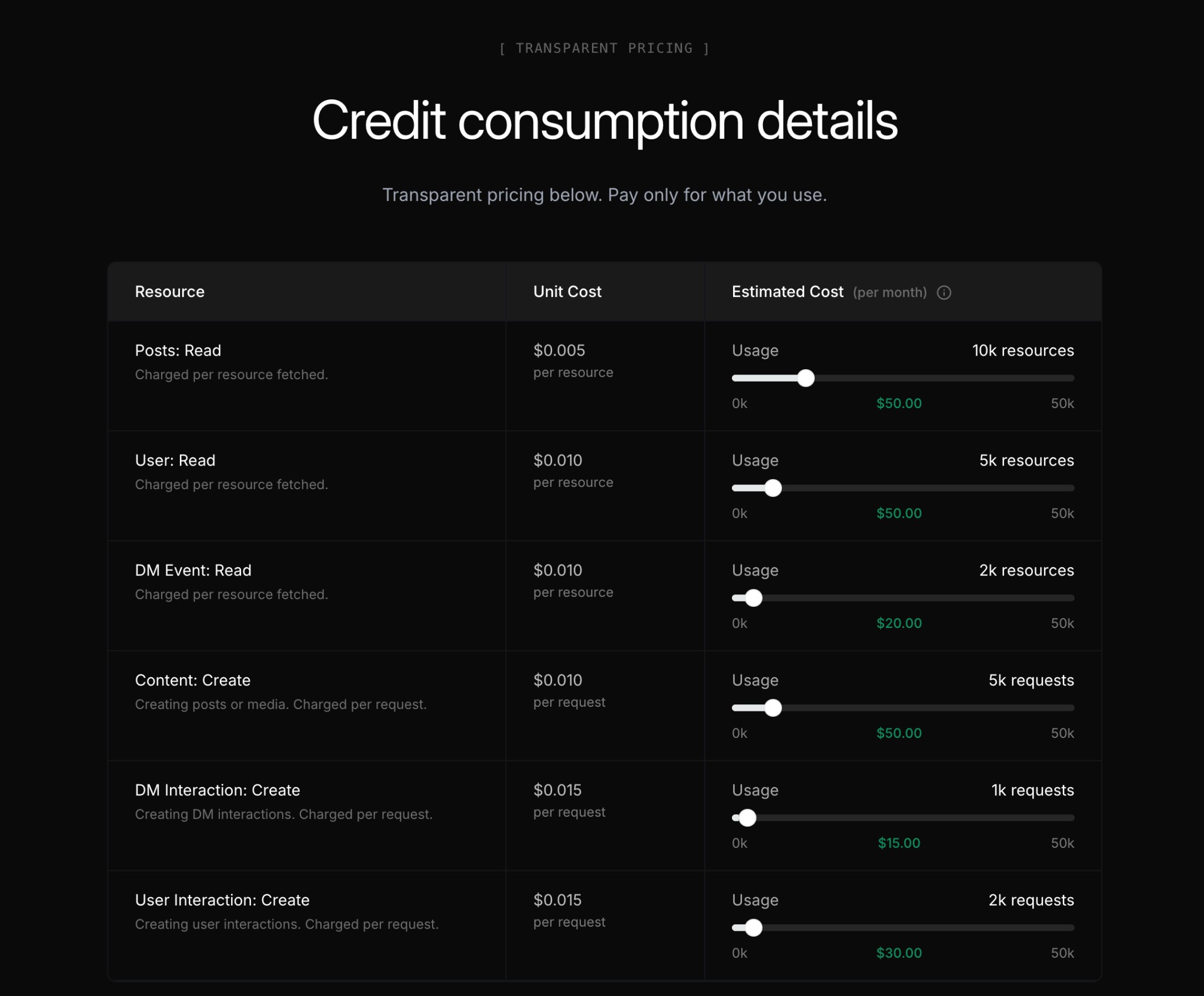
A lot has changed since then. X has reshaped its API and moved to consumption-based pricing: you pay only for what you use. On the X Developer Platform, pricing is spelled out per resource-for example, Content: Create (creating posts) is charged per request at a given unit cost, so a handful of posts per month costs pennies rather than a fixed monthly fee. Read operations (posts, user, DMs) and other create operations (DMs, user interactions) each have their own per-resource or per-request costs. For a single automated weekly tweet, that means a few "Content: Create" requests per month and a very small bill. Transparent, pay-as-you-go pricing makes it straightforward to reason about cost at low volume.
What hasn't changed is that posting to X from code is still a satisfying, concrete thing to build. So I rebuilt my weekly year-progress tweet-week number, percentage through the year, a short quote, and an AI-generated image-and used it as a chance to lean on modern tooling: Vercel AI Gateway, the Vercel AI SDK, Next.js API routes, Vercel Cron, and Vercel Workflows, with a Resend email as a final "something's wrong" notice.
Why the new stack matters
Vercel AI Gateway sits in front of multiple AI providers. You send requests to one place; the gateway routes to OpenAI, Anthropic, or others. That means you can switch models or providers without rewriting your app-you change config, not code. And you don't need to sign up with a credit card for every single provider; you can centralise that through the gateway. For a small project, that's a big reduction in friction.
Vercel AI SDK gives you a consistent way to call those models: generateText for the quote, experimental_generateImage for the image. Same patterns whether the backend is OpenAI or something else. So the "brain" of the tweet-the prompt for the quote and the image-lives in one place, and the gateway handles which API actually runs it.
Example of the kind of image the pipeline generates (a simple "year progress" visual, e.g. pie or cake with a slice for "how much of the year is left"):

Next.js API routes and Cron
The "post a tweet" logic lives in a Next.js API route: POST /api/weekly-year-tweet-gateway. It computes week number and year percentage, calls the AI SDK (via the gateway) for the quote and image, then uses the X API to post. That route is the single place that knows how to create and send the tweet.
You don't want that URL public and unguarded. So it's protected by a secret query param (e.g. ?key=...) or by the Vercel Cron header. In vercel.json you define a cron job-in my case, every Monday at 09:00 UTC-and Vercel calls your endpoint with a special x-vercel-cron header. No need to expose a key in the cron config; Vercel's invocation is the auth. That's Vercel Cron: scheduled HTTP hits to your own API route.
Resilience with Vercel Workflows
Cron runs once at the scheduled time. If the tweet fails-network blip, rate limit, provider timeout-there's no built-in retry. So the cron job doesn't call the tweet API directly. Instead it hits another route that starts a Vercel Workflow.
That workflow:
- Runs a step that calls the tweet API (the same
/api/weekly-year-tweet-gatewaywith the secret key). - If it fails, sleeps for 30 minutes (using the workflow runtime's
sleep), then retries. - Repeats for up to 4 hours (eight attempts).
- If every attempt fails, runs a second step that sends an email via Resend to a configured address: "Weekly tweet failed after 4 hours."
So you get retries without building your own queue or scheduler, and a clear "last resort" notice in your inbox. The workflow is durable: it survives restarts and deploys, and you can inspect runs in the workflow observability UI.
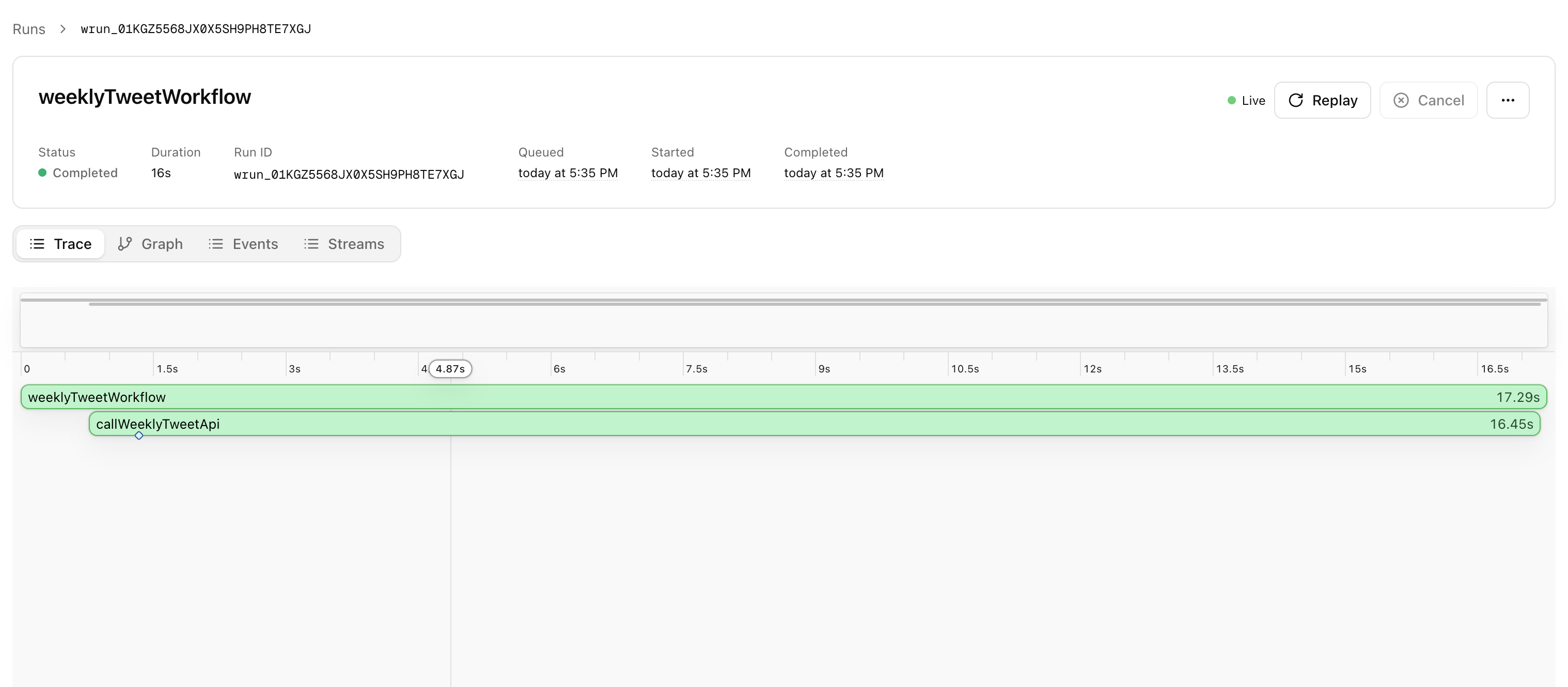
Screenshot of a workflow run (from npx workflow web or the Vercel dashboard) showing the weekly-tweet workflow and its steps:
End-to-end flow
- Vercel Cron (Monday 09:00 UTC) →
GET/POST /api/cron/weekly-tweet-workflow(with cron header). - That route starts the workflow and returns immediately with a
runId. - The workflow runs in the background: step 1 calls the tweet API; on failure, sleep 30 min, retry; after 4 hours of failure, step 2 sends the Resend email.
Manual trigger is the same URL with ?key=MANUAL_TRIGGER_KEY so you can test without waiting for Monday.
Why it's worth it
Posting to X from code is still the same satisfying "hello world" it was in 2013-but the path from idea to live tweet is different. You get:
- One gateway for multiple AI providers and one SDK for text and image generation.
- No separate sign-up and credit card for every provider; the gateway abstracts that.
- Resilience without running your own workers: Cron kicks off a workflow that retries and then notifies you.
- Observability: workflow runs and steps are visible so you can see exactly when and why something failed.
If you're bringing an old Twitter automation into 2026, or building a new one, this stack-X API, Vercel AI Gateway, AI SDK, Next.js API routes, Vercel Cron, and Vercel Workflows, with Resend as a safety net-gets you there without the old friction, and with a lot more headroom when things go wrong.